Structured Data for Beginners: Complete Guide to Schema Markup and SEO

Structured data is one of the most useful technical SEO concepts for website owners, marketers, and content creators to understand. It gives search engines additional information about what a page represents, such as an article, organization, product, event, business, or person.
For beginners, structured data can seem complicated because it involves technical terms such as Schema.org, JSON-LD, properties, entities, and rich results. However, the basic idea is simple: structured data provides machine-readable information that helps search engines understand the meaning and context of your content.
Structured data does not automatically improve rankings, and adding schema markup does not guarantee that Google will display a rich result. Instead, structured data can make eligible pages easier for search engines to interpret and can qualify them for certain enhanced search features when Google’s requirements are met.
This guide explains what structured data is, how schema markup works, the most important schema types, how to implement JSON-LD, how to test your markup, common mistakes to avoid, and how structured data fits into a modern SEO strategy.
What Is Structured Data?
Structured data is standardized information added to a webpage to describe the content and entities on that page in a format that machines can understand.
Humans can read a webpage and understand that an article has a title, an author, a publication date, and an image. Search engines also analyze these elements, but structured data gives them additional machine-readable context.
For example, a webpage might contain:
Article title: How to Fix Indexing Problems
Author: Jane Smith
Publication date: September 20, 2026
Image: An image illustrating Google indexing
Structured data can explicitly identify these elements using a vocabulary such as Schema.org.
Google explains that structured data is a standardized format for providing information about a page and classifying its content. Google can use this information to better understand pages and potentially display them with richer search features.
Structured Data vs. Normal HTML
Normal HTML primarily communicates the structure and visible content of a webpage.
For example:
<h1>Structured Data for Beginners</h1>
<p>Learn how schema markup works...</p>
Structured data adds machine-readable meaning to that information.
A JSON-LD implementation could describe the page as an article:
{
  "@context": "https://schema.org",
  "@type": "Article",
  "headline": "Structured Data for Beginners",
  "author": {
    "@type": "Person",
    "name": "Jane Smith"
  }
}
The goal is not to replace the visible content. Instead, the markup provides additional context about what that content represents.
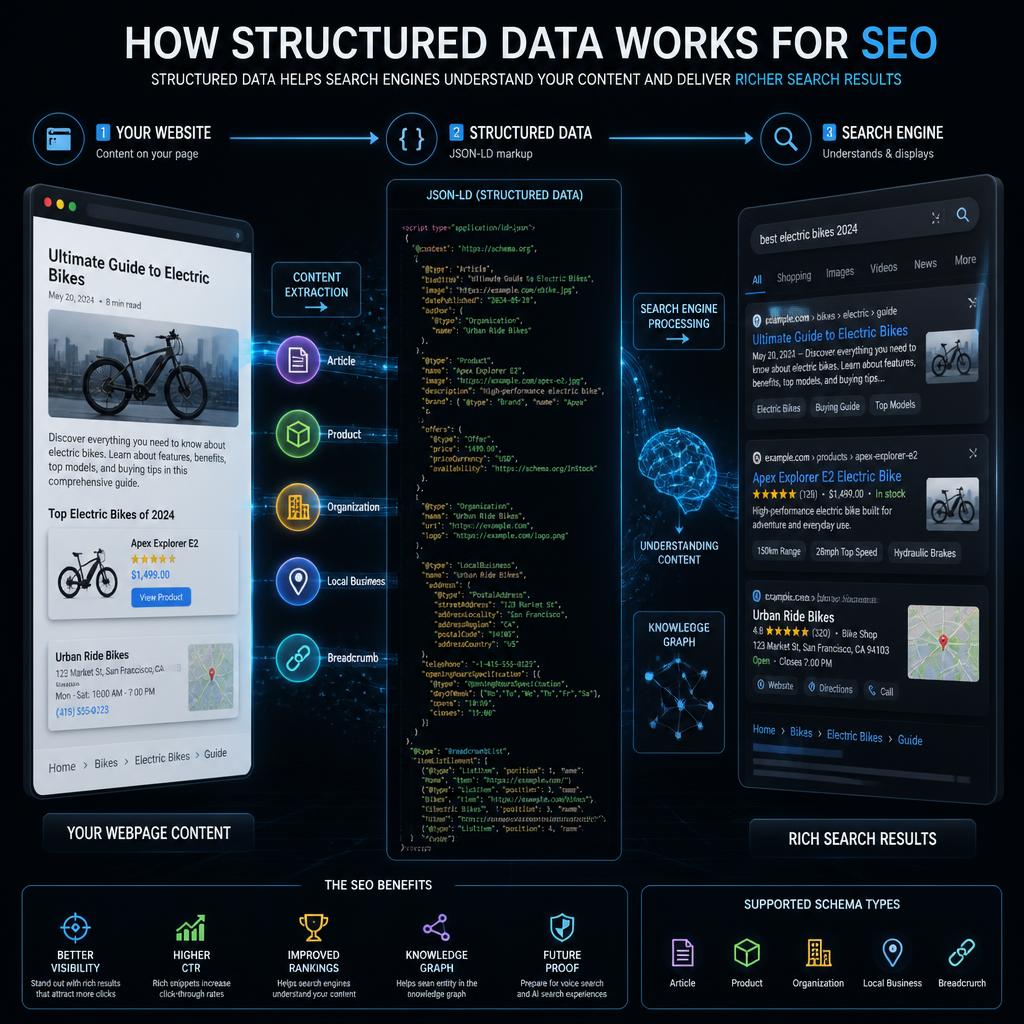
How Does Structured Data Work?
Structured data generally consists of three important concepts:
- A vocabulary
- A format
- Properties and values
1. Vocabulary
A vocabulary defines the types of things you can describe and the properties associated with them.
Schema.org is the most widely used vocabulary for website structured data. It includes types such as:
- Organization
- Person
- Article
- Product
- Event
- LocalBusiness
- Recipe
- SoftwareApplication
- VideoObject
- BreadcrumbList
Schema.org contains a large and continually evolving vocabulary covering entities, relationships, and properties.
However, an important distinction is necessary: Schema.org and Google’s supported search features are not exactly the same thing.
Schema.org contains many types and properties that can be useful to different platforms, applications, and search engines. Google has its own documentation specifying which structured data features it supports and what requirements apply to them.
2. Structured Data Format
Structured data can be implemented using different formats.
The three formats supported by Google for structured data eligibility are:
- JSON-LD
- Microdata
- RDFa
Google recommends JSON-LD in general because it is relatively easy to implement and maintain, particularly at scale.
3. Properties and Values
Properties describe characteristics of an entity.
For an Article, for example, properties can include:
- headline
- author
- image
- datePublished
- dateModified
- description
For a Product, properties can include:
- name
- image
- description
- offers
- review
- aggregateRating
The exact properties required or recommended depend on the structured data type and the search feature you are targeting.
Why Is Structured Data Important for SEO?
Structured data can support SEO in several ways, but it is important to understand what it can and cannot do.
It Helps Search Engines Understand Content
A webpage can contain ambiguous information. Structured data gives search engines explicit information about entities and relationships.
For example, the word “Apple” could refer to a fruit or a company. Structured data can provide additional context about the entity being described.
It Can Make Pages Eligible for Rich Results
One of the most important reasons websites implement structured data is to become eligible for certain enhanced search appearances.
Google currently supports structured data features including:
- Article
- Breadcrumb
- Event
- Organization
- Product
- Local Business
- Recipe
- Review snippet
- Profile Page
- Software App
- Video
- Job Posting
- Dataset
- Discussion Forum
- Q&A
- and other supported features.
Eligibility does not mean guaranteed visibility. Google decides whether and how a search feature appears.
It Can Provide More Context About Your Business
Organization structured data can help communicate information about an organization, such as its name, logo, contact information, and other applicable properties.
Google’s Organization documentation currently notes that there are no universally required properties for Organization markup; site owners should add the properties that accurately apply to their organization.
It Can Improve Search Appearance
Structured data may contribute to richer search appearances when a page qualifies for a supported feature.
For example, product structured data can help Google understand information such as product name, price, availability, and reviews, depending on the applicable feature and requirements.
However, structured data should be viewed primarily as a way to communicate information clearly to machines and become eligible for supported search features—not as a shortcut to higher rankings.
Does Structured Data Improve Google Rankings?
This is one of the most common questions beginners ask.
Structured data by itself is not a generic Google ranking factor.
Google has explicitly stated that implementing structured data does not automatically cause a page to rank higher than competing pages. However, structured data can help Google understand content and can make pages eligible for additional search experiences.
Therefore, you should not implement schema markup with the expectation that adding it will immediately increase rankings.
A better approach is to think about structured data as part of technical SEO:
Useful content + strong technical SEO + crawlability + appropriate structured data + good user experience
Structured data supports the overall system, but it does not replace high-quality content or other SEO fundamentals.
JSON-LD: The Recommended Structured Data Format
JSON-LD stands for JavaScript Object Notation for Linked Data.
It allows website owners to describe entities and relationships using a machine-readable JSON format.
A basic example looks like this:
<script type="application/ld+json">
{
  "@context": "https://schema.org",
  "@type": "Article",
  "headline": "Structured Data for Beginners",
  "author": {
    "@type": "Person",
    "name": "Jane Smith"
  }
}
</script>
One major advantage of JSON-LD is that it separates structured data from the visible HTML markup.
This can make implementation and maintenance easier, especially on websites with many pages.
Google generally recommends JSON-LD when the site’s setup allows it.
JSON-LD vs. Microdata vs. RDFa
JSON-LD
JSON-LD is usually the easiest option for beginners.
Advantages:
- Easy to read
- Easy to maintain
- Can be added without modifying every visible HTML element
- Convenient for CMS and large websites
- Recommended by Google
Microdata
Microdata adds structured data attributes directly to HTML elements.
It might look like:
<div itemscope itemtype="https://schema.org/Article">
  <h1 itemprop="headline">Structured Data for Beginners</h1>
</div>
Microdata is still supported, but it can be more difficult to maintain because the markup is integrated into the HTML structure.
RDFa
RDFa is another method of embedding structured data into HTML.
It can be useful in certain technical environments, but most beginners will find JSON-LD easier to implement.
For most modern websites, JSON-LD is the practical starting point.
Common Schema Types You Should Know
There are many Schema.org types, but website owners usually encounter a smaller group repeatedly.
Organization Schema
Organization structured data describes an organization.
Potential information includes:
- Organization name
- Logo
- URL
- Contact information
- SameAs profiles
- Other relevant organization properties
This is especially useful for company websites and brand entities.
Google provides specific documentation for Organization structured data and recommends adding applicable properties rather than assuming every property is mandatory.
Article Schema
Article structured data can describe articles and blog posts.
Potential properties include:
- Headline
- Author
- Image
- Date published
- Date modified
- Description
Google supports Article structured data for eligible content and provides guidelines for implementation.
For a content website, Article markup can help search engines better understand the relationship between the page and its article information.
Product Schema
Product structured data is particularly important for ecommerce websites.
Depending on the applicable Google feature, product information may include:
- Product name
- Description
- Image
- Price
- Availability
- Reviews
- Aggregate ratings
- Shipping information
- Return information
Google distinguishes between Product snippets and Merchant listings because they serve different purposes.
For example, a merchant selling products directly may use structured data to communicate detailed product information that can be used across Google’s shopping-related experiences.
LocalBusiness Schema
LocalBusiness structured data can describe businesses operating at physical locations.
Potential information includes:
- Business name
- Address
- Telephone number
- Opening hours
- Departments
- Reviews, where applicable
Google explains that LocalBusiness markup can provide information about a business that may be used in Search and related experiences.
BreadcrumbList Schema
Breadcrumb structured data describes the hierarchy of a webpage.
For example:
Home → SEO → Technical SEO → Structured Data
Breadcrumbs can help communicate the relationship between a page and the site’s broader hierarchy.
Google supports Breadcrumb structured data as a search feature.
Event Schema
Event structured data describes events such as conferences, performances, or other eligible events.
Potential information includes:
- Event name
- Start date
- End date
- Location
- Event status
- Offers or ticket information
Google provides specific requirements for Event structured data and recommends monitoring it through Search Console after deployment.
Recipe Schema
Recipe structured data can describe cooking recipes.
It may include:
- Recipe name
- Image
- Ingredients
- Instructions
- Preparation time
- Cooking time
- Ratings
Google’s Recipe documentation specifies the required and recommended properties needed for eligibility.
SoftwareApplication Schema
Software and app websites may also benefit from structured data describing applications.
Depending on the supported search feature and implementation, information may include application name, operating system, category, rating, and other relevant details.
Structured Data and AI Search
Structured data is also relevant to the broader evolution of search toward entity-based and machine-assisted information retrieval.
Modern search systems need to interpret relationships between entities, topics, products, organizations, authors, and content.
Structured data provides an explicit machine-readable representation of some of those relationships.
However, it is important not to treat Schema.org as a guaranteed way to make an AI system cite or recommend a website.
There is no universal “AI search schema” that guarantees inclusion in ChatGPT, Google’s AI features, or other AI systems.
A stronger approach is to combine:
- Accurate structured data
- Clear content
- Well-defined entities
- Strong internal linking
- Author information where appropriate
- Original information
- Trustworthy sources
- Good technical SEO
- Crawlable and indexable pages
Structured data can support machine understanding, but it should be part of a broader content and technical strategy.
How to Implement Structured Data Step by Step
Step 1: Identify the Page Type
Start by asking:
What is this page actually about?
Is it:
- An article?
- A product?
- A business?
- An organization?
- An event?
- A recipe?
- A profile?
- A video?
Do not select a schema type simply because it sounds useful.
The markup should accurately describe the actual page.
Step 2: Check Google’s Documentation
After identifying the relevant schema type, check Google’s documentation for that specific search feature.
This is important because Schema.org contains more properties and types than Google necessarily uses for its search features.
Google recommends relying on Google Search Central documentation for Google Search behavior.
Step 3: Select Required and Recommended Properties
Some structured data types have required properties for eligibility.
Others may have recommended properties that provide additional context.
Do not fill properties with invented information simply to make your markup look more complete.
Step 4: Create JSON-LD
For most websites, JSON-LD is the simplest implementation method.
A basic Article example might look like:
{
  "@context": "https://schema.org",
  "@type": "Article",
  "headline": "Structured Data for Beginners",
  "author": {
    "@type": "Person",
    "name": "Jane Smith"
  },
  "datePublished": "2026-09-20",
  "dateModified": "2026-09-20"
}
The actual values should correspond to the real page.
Step 5: Add It to the Page
JSON-LD can generally be added to the HTML using a script element.
For WordPress websites, SEO plugins can often generate structured data automatically.
Popular SEO plugins may provide schema features without requiring users to manually write JSON-LD for every page.
However, automatically generated schema should still be reviewed.
Step 6: Test the Markup
Google recommends using the Rich Results Test to determine whether your structured data can generate supported Google rich results.
You can also use the Schema Markup Validator to validate Schema.org markup more generally.
The Schema.org validator can extract JSON-LD, RDFa, and Microdata and identify syntax problems.
These tools serve slightly different purposes.
The Rich Results Test focuses on Google’s supported search features.
The Schema Markup Validator focuses more broadly on Schema.org markup.
How to Use Google Search Console With Structured Data
Testing structured data before publication is only part of the process.
After deploying schema markup, monitor your website in Google Search Console.
Google recommends checking relevant rich-result reports after structured data has been deployed and after major template or code changes.
A practical workflow is:
- Implement structured data.
- Test the page.
- Publish the changes.
- Use URL Inspection.
- Allow Google to crawl the page.
- Monitor relevant enhancement or rich-result reports.
- Fix invalid items.
- Validate fixes when appropriate.
Keep in mind that crawling and reprocessing can take time.
Digital PR Strategy 2026: AI and Automation
Best Content Formats for AI Citations in 2026
Measuring AI Search Traffic in 2026: Complete Guide
Structured Data Does Not Guarantee Rich Results
This point deserves special attention.
You can have:
- Correct JSON-LD
- No syntax errors
- Valid required properties
- A page that is indexed
…and still not receive a rich result.
Google explicitly states that correctly implemented structured data does not guarantee that the corresponding search feature will appear.
Google may choose a different search presentation based on multiple factors.
A rich result can also fail to appear if:
- The markup does not represent the page content
- The information is misleading
- The content is hidden
- The page does not satisfy specific feature guidelines
- The page has other technical or quality problems
Therefore, “valid structured data” and “guaranteed rich result” are not the same thing.
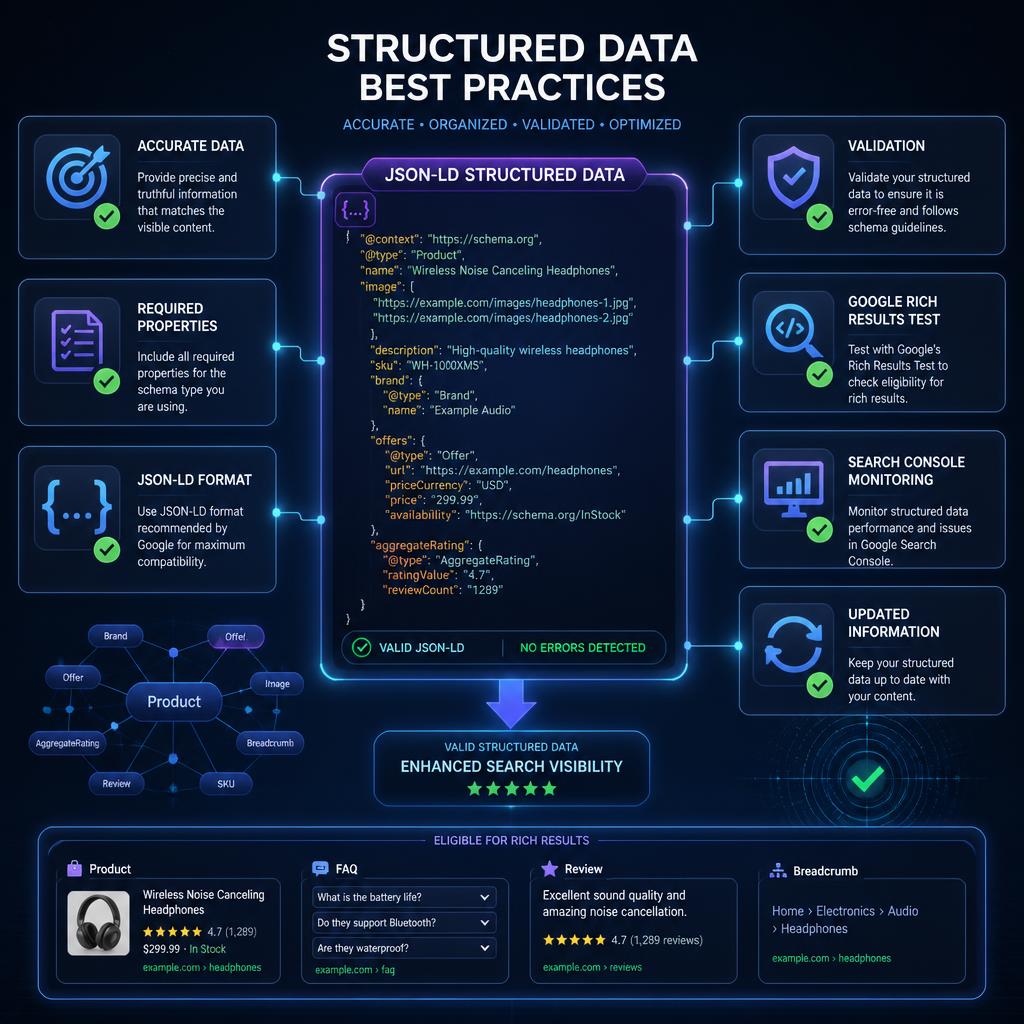
Structured Data Best Practices
1. Mark Up What Users Can See
One of the most important rules is that your structured data should represent content that is actually available on the page.
Google’s guidelines prohibit marking up content that is not visible to users or adding misleading information.
2. Keep Information Accurate
If a product costs $50, do not mark it up as $20.
If an article was published on September 20, do not invent a different publication date.
If your organization has a specific name, use its real name.
Accuracy is more important than filling every possible property.
3. Do Not Add Fake Reviews
Reviews and ratings can be valuable structured data, but they must accurately represent legitimate content.
Never create fake ratings simply to obtain stars in search results.
Google’s structured data guidelines specifically warn against misleading markup.
4. Keep Structured Data Updated
If information changes on the page, update the corresponding structured data.
This is especially important for:
- Product prices
- Product availability
- Event dates
- Business hours
- Reviews
- Publication dates
5. Use the Most Specific Appropriate Type
If a page clearly represents a specific supported type, use the appropriate type rather than selecting a generic schema simply because it is easier.
At the same time, do not force a page into a schema category that does not accurately describe it.
6. Avoid Schema Stuffing
Adding dozens of unrelated schema types to one page does not automatically make the page more optimized.
Every piece of markup should have a legitimate relationship with the page content.
7. Keep Your Markup Technically Accessible
Google’s general structured data guidelines state that structured-data pages should not be blocked from Googlebot through mechanisms such as robots.txt, noindex, or access controls when you want the markup considered for rich results.
Common Structured Data Mistakes
Mistake 1: Assuming Schema Is a Ranking Shortcut
Adding schema does not automatically increase rankings.
Structured data is not a replacement for:
- Helpful content
- Search intent optimization
- Internal linking
- Technical SEO
- Backlinks and digital authority
- Page experience
- Crawlability
Mistake 2: Marking Up Hidden Content
Do not add structured data describing information that users cannot access when the relevant guidelines require the information to be visible.
Mistake 3: Using Incorrect Properties
Using properties incorrectly can create validation errors or produce markup that does not accurately describe the page.
Mistake 4: Copying Schema From Another Website
A competitor may have a completely different page structure and business model.
Use their implementation as something to study, not something to blindly copy.
Mistake 5: Ignoring Google’s Feature-Specific Requirements
Schema.org may allow a property that is not relevant to Google’s specific rich-result requirements.
Always check the Google documentation for the search feature you are targeting.
Mistake 6: Assuming Every FAQ Can Generate a Rich Result
FAQ structured data is a particularly important example.
Google changed how FAQ rich results are displayed, limiting regular FAQ rich-result visibility primarily to well-known authoritative government and health websites. For most other websites, FAQ markup should not be treated as a dependable way to obtain an FAQ rich result.
You can still create useful FAQ content for users, but do not build your SEO strategy around the expectation that Google will display a large FAQ rich result.
Structured Data Checklist
Before publishing structured data, use this checklist:
- ☐ Identify what the page actually represents
- ☐ Select an appropriate Schema.org type
- ☐ Check Google’s documentation for the relevant feature
- ☐ Use JSON-LD when practical
- ☐ Add required properties
- ☐ Add relevant recommended properties
- ☐ Make sure the information is accurate
- ☐ Make sure markup represents visible page content
- ☐ Avoid fake reviews or misleading information
- ☐ Test the page with Rich Results Test
- ☐ Validate Schema.org markup when appropriate
- ☐ Check the page with URL Inspection
- ☐ Monitor Search Console after deployment
- ☐ Update structured data when page information changes
Best Structured Data Strategy for a WordPress Website
If you run a WordPress website, you do not necessarily need to manually create JSON-LD for every page.
Many modern SEO plugins and WordPress themes can generate basic structured data automatically.
A practical strategy is to:
Homepage
Use appropriate Organization or related entity markup when it accurately describes the website.
Blog Posts
Use Article markup when the page genuinely represents an article.
Product Pages
Use Product markup when the page represents a product and meets the relevant requirements.
Local Business Pages
Use LocalBusiness markup for appropriate local business pages.
Site Navigation
Use BreadcrumbList markup when it accurately represents the site’s breadcrumb hierarchy.
The key is not to add as much schema as possible.
The goal is to create accurate, useful, and maintainable structured data.
Structured Data for Ecommerce Websites
Ecommerce websites can gain substantial value from accurate product structured data because product information is highly structured by nature.
Important information can include:
- Product name
- Brand
- Image
- Price
- Currency
- Availability
- Product identifiers
- Reviews
- Ratings
- Shipping information
- Return information
Google’s product documentation distinguishes between product snippets and merchant listings, with different purposes and requirements for each.
For ecommerce sites, structured data should be kept synchronized with actual product information.
A common technical problem occurs when a product page displays one price to users but structured data contains another price.
That type of inconsistency can undermine the usefulness of the markup and may prevent eligibility for certain search features.
Structured Data for Content Websites
For publishers, bloggers, and content websites, Article structured data is often one of the most relevant options.
A strong implementation can describe:
- Article headline
- Author
- Publication date
- Modification date
- Main image
- Description
However, Article markup should complement strong editorial practices.
Schema cannot turn thin or unhelpful content into high-quality content.
The visible article remains the primary source of information for users.
Structured Data for Local SEO
Local businesses can use structured data to communicate information about their business.
Depending on the business and page, relevant information may include:
- Business name
- Address
- Phone number
- Opening hours
- Location
- Departments
- Other applicable properties
LocalBusiness markup is designed to help search engines understand information about businesses and their locations.
However, structured data should complement, rather than replace, other local SEO assets such as an accurate Google Business Profile, consistent business information, useful location pages, and legitimate customer reviews.
What is the new AI trend in marketing?
How AI Supercharges Online Sales in 2026
How to Monitor Structured Data Performance
After implementation, monitoring is important.
Look at:
Search Console
Monitor relevant rich-result or enhancement reports for:
- Valid items
- Invalid items
- Warnings
- Changes over time
Rich Results Test
Use the Rich Results Test when developing or troubleshooting markup.
URL Inspection
Use URL Inspection to understand how Google sees an individual URL and whether the page is accessible.
Organic Search Performance
Do not measure structured data success only by whether a rich result appears.
Also consider:
- Organic impressions
- Clicks
- Click-through rate
- Indexed pages
- Search appearance
- Product visibility
- Rich-result eligibility
- Technical errors
Remember that correlation does not necessarily mean that structured data itself caused a traffic increase.
AEO vs GEO vs SEO: Complete Comparison 2026
How do I check my Google SEO ranking?
Frequently Asked Questions About Structured Data
What is structured data in SEO?
Structured data is machine-readable information added to a webpage to help search engines understand the page’s content, entities, and relationships.
Is structured data a Google ranking factor?
Structured data itself is not a generic ranking factor. Google has stated that structured data can help it understand content and make pages eligible for certain search features, but adding it does not automatically improve rankings.
What is the best structured data format?
For most website owners, JSON-LD is the recommended starting point because Google generally recommends it when the site’s setup allows it.
Does every website need structured data?
Not every page needs extensive structured data. The best approach is to implement relevant markup where it accurately describes the content and provides a useful search feature or machine-readable context.
Does structured data guarantee rich results?
No. Google explicitly states that structured data makes a page eligible for certain search features but does not guarantee that those features will appear.
What is Schema.org?
Schema.org is a collaborative vocabulary for structured data. It defines types and properties that websites can use to describe entities, content, and relationships.
What is JSON-LD?
JSON-LD is a format for representing linked data using JSON. It is commonly used to add Schema.org structured data to webpages.
Should I use Schema.org or Google documentation?
Use both, but for Google Search eligibility, prioritize Google’s Search Central documentation because Google defines its own supported features and requirements.
Can structured data help AI search?
Structured data provides machine-readable information that can contribute to clearer entity and content understanding. However, there is no guarantee that adding schema will cause an AI search system to cite, recommend, or select a website.
How do I test structured data?
Use Google’s Rich Results Test for Google-supported rich-result eligibility and the Schema Markup Validator for broader Schema.org validation.
Can I add multiple schema types to one page?
Yes, when they accurately describe the page and its entities. The goal should be meaningful relationships rather than adding unrelated markup simply to increase the amount of schema.
Conclusion
Structured data is an important part of modern technical SEO because it gives search engines standardized, machine-readable information about webpage content and entities.
For beginners, the most practical approach is straightforward:
Understand the page → choose the appropriate schema → use accurate properties → implement JSON-LD → test it → monitor Search Console → keep it updated.
Start with structured data that genuinely represents your website rather than trying to implement every available schema type.
For a content website, Article and Breadcrumb markup may be useful. For a company website, Organization markup may be appropriate. Ecommerce websites can use relevant Product structured data, while local businesses can use LocalBusiness markup when applicable.
Most importantly, remember that structured data is not a shortcut to higher rankings and does not guarantee rich results. Its primary value is helping search engines understand your content and making eligible pages available for supported enhanced search experiences.
When structured data is combined with useful content, strong technical SEO, accurate entity information, good internal linking, and a crawlable website, it becomes a valuable part of a comprehensive search strategy.
Official Resources
Schema.org: Use Schema.org to explore structured data types and properties.
Google Search Central — Structured Data: Use Google’s documentation to understand supported structured data features and implementation requirements.
Google Rich Results Test: Use Google’s testing tool to determine which supported rich-result features your structured data may qualify for.
Schema Markup Validator: Use the Schema.org validator to check Schema.org structured data and identify syntax issues.